

The robots.txt file was once the most important tool for managing the indexing of a website by search engines. Previously, errors in this file could result in search engine robots being unable to scan your site or, conversely, gaining access to restricted sections.
In this article, you will learn what changes to the importance of robots.txt in Google have occurred recently and get step-by-step instructions on how to check the file for errors using various tools.
- What is a robots.txt file and why to check it
- Preparing for inspection
- Checking robots.txt in Google
- Checking robots.txt in Bing Webmaster Tools
- Login to Bing Webmaster Tools
- Finding and using tools to check robots.txt
- Step-by-step instructions for working with the tool
- Features of Bing verification
- How to test robots.txt with third-party tools
- Regular inspections and monitoring
- Optimal frequency of robots.txt checks
- Monitoring automation
- Responding to warnings and errors
- Inclusion of robots.txt check in general SEO audit
- Conclusion
Now Google holds the robots meta tag and other elements responsible for limiting page crawling.

Whereas Bing still claims the importance of a robots.txt file to control the crawling of its search engine bots sites.
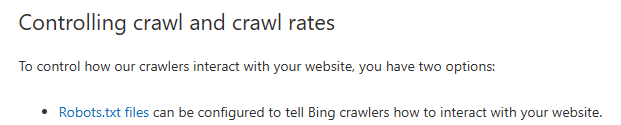
https://www.bing.com/webmasters/help/which-crawlers-does-bing-use-8c184ec0
Read about all the ways to close a page from indexing in our article.
What is a robots.txt file and why to check it
robots.txt is a text file that is placed in the root directory of the site and contains instructions for search robots (user-agents). It can be used to allow or disallow indexing of certain sections of the site.
Why it is important to check robots.txt:
- Errors in syntax can lead to full or partial blocking of a site in search.
- Incorrect directives can accidentally open private sections for indexing.
- Search engines may interpret ambiguous rules differently.
Preparing for inspection
Before starting the test, make sure that:
- The file is placed correctly: robots.txt should be located at https://site.com/robots.txt. For example: https://iconsult.agency/robots.txt
- The file is accessible: Open this address in your browser and check that the file loads without errors.
- File content is correct: Check manually for obvious typos, blank lines or incorrect characters.
Checking robots.txt in Google
Using the “Check robots.txt” tool
Step 1: Access the Google Search Console tool
To get started with Google Search Console, you need to sign in to your Google account and go to the Google Search Console website.
After that, you need to select the desired site from the list of connected resources. If your site is not on the list, you need to add it by confirming access rights using the suggested methods (e.g. HTML file, meta tag or Google Analytics).
Step 2: Go to the Settings section
Once you have selected a site, open its dashboard in Google Search Console.
Go to the “Settings” section. In this section, a “Scan” box will be available that allows you to check the settings of this file and make sure the restrictions for search engine robots are correct. Find this tool in the menu and open it to check it.

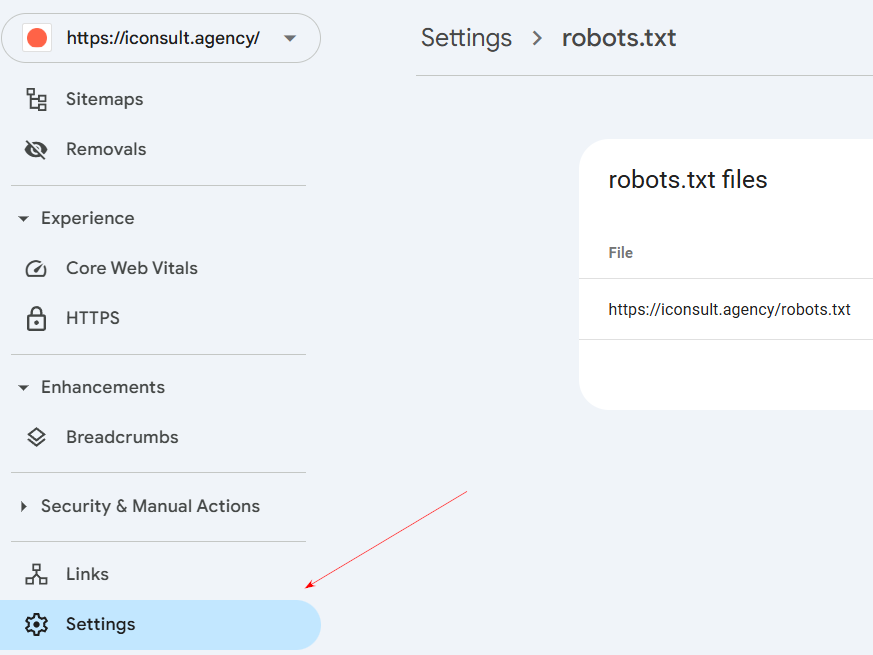
Step 3: Check and analyze the robots.txt file
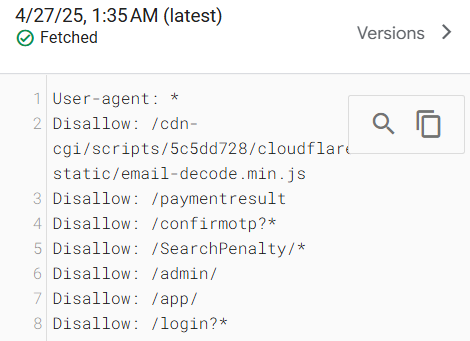
In the “Scan” field, open the report, and you can see the contents of the robots.txt file, which controls the access of search engines to your site.
Type or copy the text of the file in the special field and click on the “Check” button. The results will show you which pages of the site are allowed to be indexed and which are prohibited. This will help you understand whether the restrictions for search engines are properly configured, as well as identify possible errors.
Step 4: Make the changes and test how they work
If during the verification process errors were found or you want to change the access rules for search engines, open the robots.txt file and make the necessary changes.
For example, you can allow or disallow indexing of certain sections of the site by adding or changing directives.
Checking robots.txt in Bing Webmaster Tools
Login to Bing Webmaster Tools
To get started with checking the robots.txt file in the Bing search engine, you need to access the webmaster panel:
- Open the official Bing Webmaster Tools website in your browser
- Click on the “Sign in” button at the top right corner of the page
- Sign in using your Microsoft (including Outlook, Hotmail, Live or other Microsoft services) or Google account.
- If your site has not yet been added to Webmaster Tools, click on “Add your site” and follow the instructions to confirm ownership
Finding and using tools to check robots.txt
After successfully logging into Bing Webmaster Tools and adding a website:
On the left sidebar, find and select Tools & Enhancements -> Robots.txt file validation tool
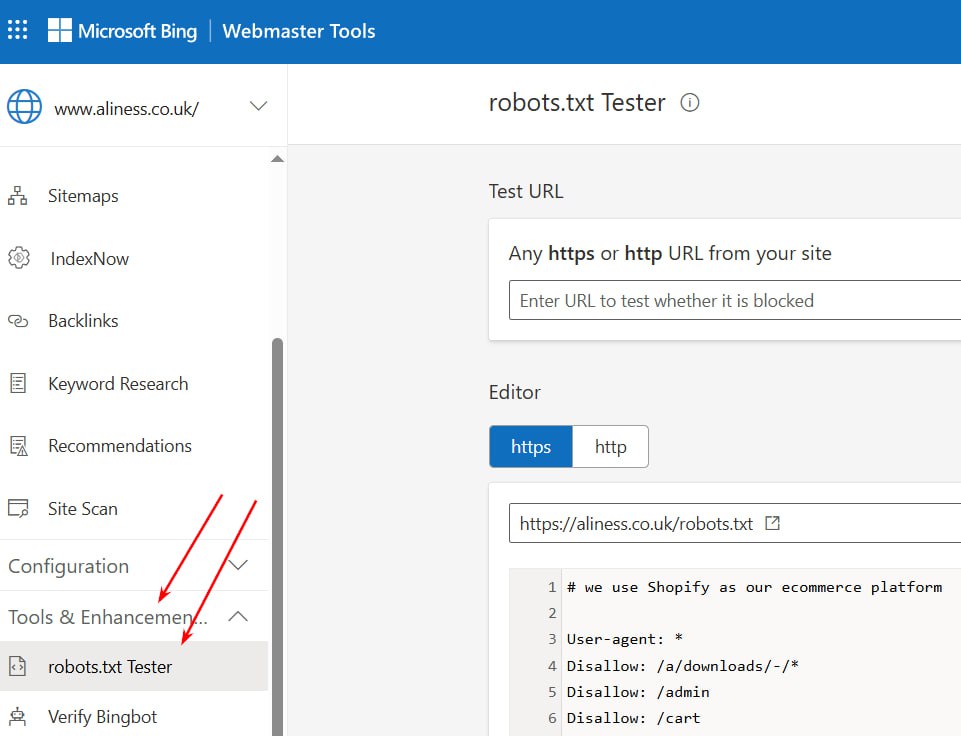
Step-by-step instructions for working with the tool
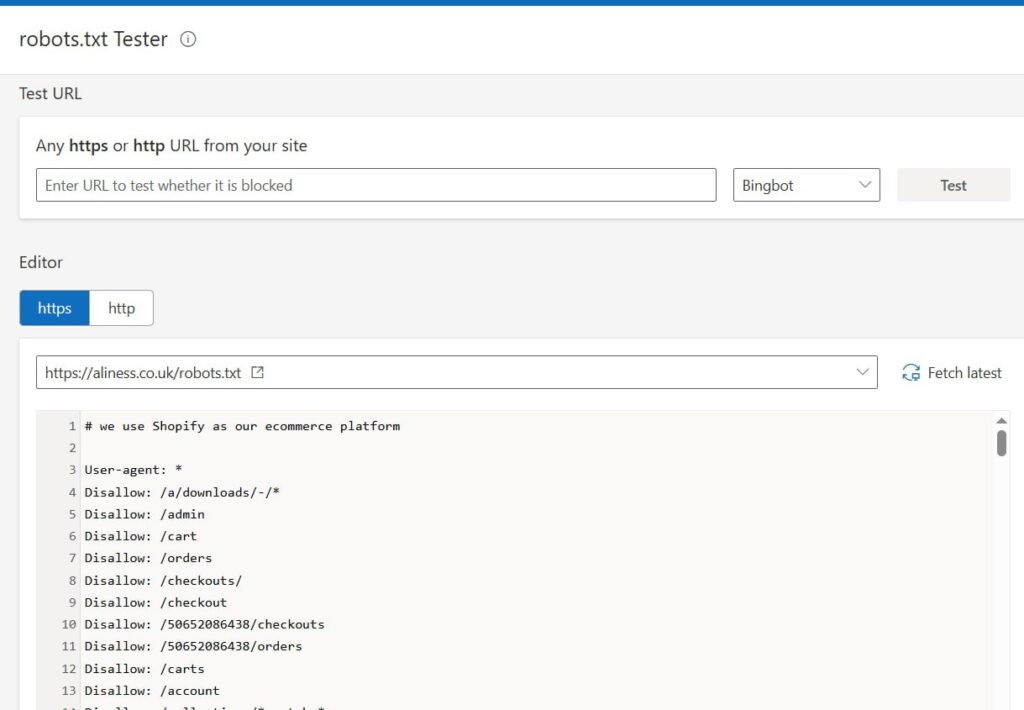
After going to the robots.txt validation tool, follow the steps below:
- You will see an editor with the current contents of your site's robots.txt file;
- Above the editor is a field to enter the URL you want to test;
- Enter the full URL of the page you want to test (e.g. https://www.yourdomain.com/page/);
- Select the type of user agent (Bingbot, BingPreview or others);
- Click the “Check” or “Test” button to run the test;
- The system will display the result: the selected bot is allowed or not allowed to index the specified URL;
Features of Bing verification
Bing Webmaster Tools has a few unique features when checking robots.txt:
- Advanced directive analysis - Bing provides detailed information on how robots.txt directives affect the indexing of a particular URL;
- Integration with SEO reports - the results of the check can be included in an overall SEO report on the status of the site;
- Optimization suggestions - the tool can offer recommendations on how to improve the robots.txt structure;
- Checking for different types of bots - you can test URL accessibility not only for the main Bing bot, but also for specialized bots (e.g. mobile version);
- Delayed processing - Bing can process changes to robots.txt with a small delay compared to Google;
How to test robots.txt with third-party tools
In addition to Google and Bing, there are many professional SEO tools that allow you to further analyze the behavior of the robots.txt file and its impact on crawling and indexing. This is especially useful for sites with a large volume of pages or a complex structure.
| Tool | Opportunities | Notes |
| Screaming Frog | Shows which pages are blocked by robots.txt, visualizes crawling | Great for site audits |
| Ahrefs Site Audit | Identifies locks, syntax problems, and accessibility issues | Convenient for a comprehensive SEO audit |
| Ryte | Provides reports on robots.txt, .htaccess, meta-robots | Suitable for technical analysis |
| Sitebulb | Does technical analysis and notes which URLs are closed | Useful when checking large sites |
| TechnicalSEO.com robots.txt Tester | Online tool for quick rule checking | Free and easy to use |
Regular inspections and monitoring
Optimal frequency of robots.txt checks
Determining the optimal frequency of robots.txt file checks depends on several factors:
- For static sites with rare updates, it is recommended to check robots.txt at least once a quarter to make sure that all settings are up to date and working correctly.
- For actively developing projects with frequent changes in the structure is optimal to check robots.txt monthly, and in case of significant changes to the site - immediately after the introduction of these changes.
- For e-commerce sites with constant updating of catalogs and seasonal promotions is recommended monthly check, as well as an additional audit before the beginning of important marketing periods (Black Friday, New Year holidays).
- After technical updates to the platform or CMS, be sure to double-check, as some updates can affect robots.txt or even overwrite it.
Monitoring automation
The following automation methods can be used to effectively control robots.txt:
- Setting up notifications in Google Search Console and Bing Webmaster Tools - these tools can alert you to problems with the robots.txt file via email.
- Using specialized monitoring services - tools such as Sitebulb allow you to set up automatic robots.txt checks and be notified of any changes or issues.
- Integrate with CI/CD systems - if you use continuous integration systems, add tests to them to verify robots.txt correctness before each deploy to production.
- Create automation scripts - simple Python or PHP scripts can regularly check the availability and content of robots.txt, comparing it to a reference version.
- Monitoring server logs - analyzing robots.txt requests can help identify new bots or unusual access patterns.
Responding to warnings and errors
If you find any problems with robots.txt, follow this algorithm:
- Classify the problem - determine whether the error is critical (blocking important sections) or non-critical (syntax warnings).
- Prioritize fixes - fix problems that affect the indexing of key content and conversion pages first.
- Documenting changes - keep a log of all changes made to robots.txt with the date, the reason for the change and the expected result.
- Phased implementation - if the changes are significant, make changes gradually so that you can monitor their impact on indexing.
- Verification of corrections - after making changes, recheck the file using official Google and Bing tools, as well as monitor the behavior of search robots in the server logs.
Inclusion of robots.txt check in general SEO audit
A robots.txt check should be integrated into a comprehensive SEO audit as follows:
- Technical component of the audit - robots.txt check should be included in the initial stage of the technical SEO audit, as the interpretation of other data may depend on its results.
- Correlation with indexation data - compare the directives in robots.txt with the actual state of indexation of pages in Google and Bing.
- Analyze in the context of the site structure - evaluate robots.txt rules taking into account the current site architecture, especially after a redesign or restructuring.
- Check for consistency with other elements - ensure that directives in robots.txt do not conflict with robots meta tags, X-Robots-Tag headers and sitemap.xml file.
- Include a checklist for launching new sections - add checking and adjusting robots.txt to a mandatory checklist when launching new sections of the site or functionality.
Regular monitoring and timely response to robots.txt issues will help ensure your site is properly indexed and avoid common problems with content visibility in search engines.
Conclusion
Proper setup and regular checking of the robots.txt file - these are important elements of successful work on SEO promotion of the site.
Checking the correctness of robots.txt should not be a one-time event. Regular monitoring using the official Google Search Console and Bing Webmaster Tools, as well as additional third-party services, allow you to identify potential problems and prevent negative impact on the visibility of the site in search engines.
Follow the step-by-step instructions provided in this article and you will be able to keep your robots.txt file in optimal condition, ensuring proper indexing of important content and protecting technical sections from unwanted attention of search engine robots. This will improve your site's visibility in search results and increase the effectiveness of your entire SEO strategy.
If you have difficulties in setting up and checking the robots.txt file for your online store or website, please contact our iConsult.agency.
We will always help you!
- N8N service for automating routine SEO tasks
- A complete SEO checklist for blogging: how to write articles that drive traffic
- How to use Instagram for SEO
- How to manage your reputation on Google: a guide to SERM for businesses in 2025
- Checklist for technical SEO audit of a website
Your point of view caught my eye and was very interesting. Thanks. I have a question for you.
I don’t think the title of your article matches the content lol. Just kidding, mainly because I had some doubts after reading the article.
Your point of view caught my eye and was very interesting. Thanks. I have a question for you.
Your point of view caught my eye and was very interesting. Thanks. I have a question for you. https://www.binance.info/register?ref=IHJUI7TF
Your point of view caught my eye and was very interesting. Thanks. I have a question for you.
Your point of view caught my eye and was very interesting. Thanks. I have a question for you.
Can you be more specific about the content of your article? After reading it, I still have some doubts. Hope you can help me. https://accounts.binance.com/es-AR/register?ref=UT2YTZSU
Your article helped me a lot, is there any more related content? Thanks! https://www.binance.com/register?ref=QCGZMHR6
Thanks for sharing. I read many of your blog posts, cool, your blog is very good. https://accounts.binance.com/register-person?ref=IHJUI7TF
[…] The robots.txt file is a standard tool designed to tell search engines and other robots which pages or resources on your site should be crawled or indexed. With this file, you can control access to pages, preventing neural networks and other automated systems from indexing content. […]