
You may have different reasons to hide or remove a page from the index. It is important to do it competently, so as not to harm the SEO-promotion of your site.
There are different removal methods, manual and automatic, but none of them are universal. Let's understand how you can remove a URL from Google and Yandex searches, depending on the circumstances.
- Which pages should be removed from the index?
- Ways to remove a page from search
- Manually remove a page from the webmaster panel
- Remove page from site and get 404 (410) server response
- Close page from indexing in robots.txt file
- Use robots meta tag
- Use X-Robots-Tag headers
- Remove via rel="canonical" tag
- Conclusion
Which pages should be removed from the index?
There are a number of pages that do not benefit by their indexing:
- personal account login page (login or registration);
- sorting pages (by rating, price, popular, new items, promotional items);
- system files;
- pages with an irrelevant product or category;
- sensitive data;
- pages with non-unique or duplicate content;
- trash pages and printable version of pages.
Remove them from the index should be to improve the position of the site in the output, protect user data and focus the attention of the search engine on more useful pages.
Better yet, make a proper site structure right away.
Ways to remove a page from search
Manually remove a page from the webmaster panel
This is the fastest way to remove pages from the Yandex and Google index. Here you can remove pages for 90 days, after which they will return to SEPR again. To remove pages permanently, they must be locked from the robot using the methods we will discuss later in this article. Like any manual labor, this method is suitable if you need to urgently remove a small number of pages from search.
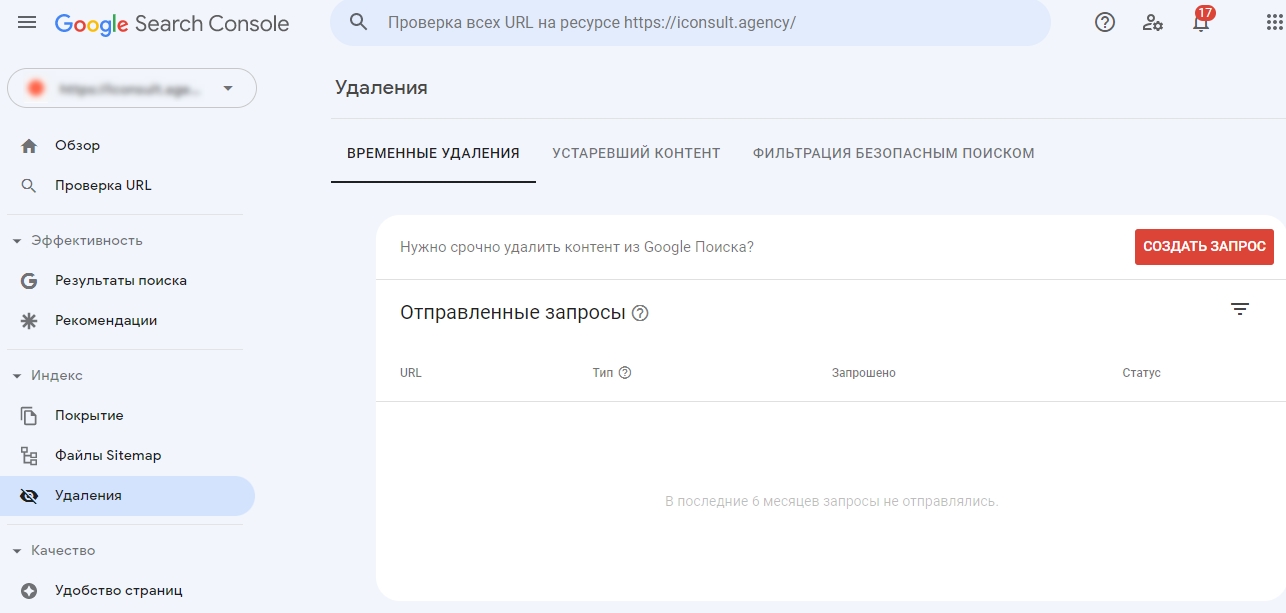
Remove a page from the site and get a 404 server response (410)
The easiest way to remove a page from search is to remove the physical page from the site. This process differs depending on the CMS. For example, in WordPress, all you need to do to do this is select "Remove to Trash" in the editor.
Once deleted, the page receives a 404 server response and the search engine robot will remove the page from the index after it is crawled again.
A 404 response code means that the page is temporarily deleted for search engine robots, so it will still appear in the output and be available in the cache for some time. To speed up the deletion process, you can assign a 410 server response to the page.
Before you delete a page, remove the links that lead to it from the entire site so they don't make broken links.
Keep in mind that by deleting a page you remove its weight and other important SEO factors. To avoid this, it is better to use 301 redirect to a similar page, a page from the parent category or to the main page of the site. This will also solve the problem of broken links.
Close the page from indexing in the robots.txt file
In the file robots.txt you can write directives - commands for search robots. They should be written on a new line, followed by a colon and the full address of the file in the directory.
The disallow directive closes pages or sections from being viewed by robots. For Yandex it is 100% method to remove a page from the index, but for Google it is only a recommendation that does not work. You can check this with the Search Console report "Indexed despite blocking in robots.txt file".
To close the page from indexing in all search engines, you should write in the robots.txt file:
User-Agent: *
Disallow: page path
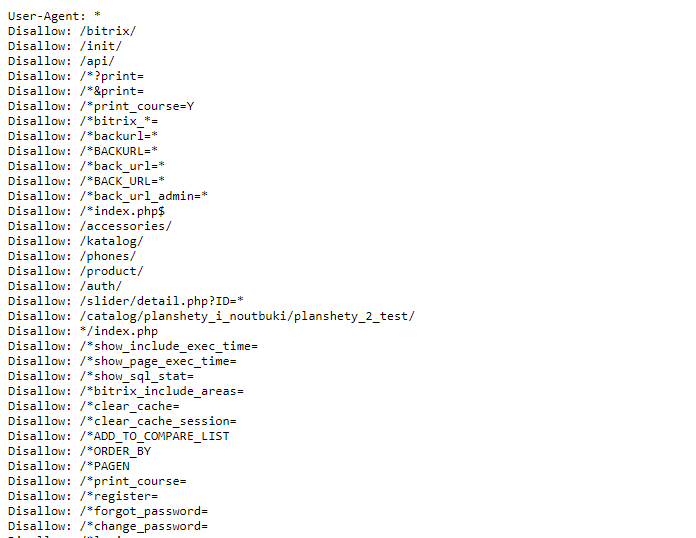
If you want to close a page, such as duplicates, in Yandex, type:
User-Agent: Yandex
Clean-param: sort_field&order
After you can make sure that robots.txt is filled correctly in Google and Yandex services.
Use the robots meta tag
Attribute is an additional characteristic of a tag or meta tag.
By using the "robots" attribute in the page code, you will close the page from indexing for search robots of all search engines.
<meta name="robots" content="noindex, nofollow" />You can also do this for a particular search engine's robot.
<meta name="yandex" content="noindex, nofollow" />
<meta name="googlebot" content="noindex">
The "nofollow" attribute will prevent all links on the page from being indexed.
You can set the value of "follow". In the long run, "noindex, follow", according to Google analyst John Mueller, is equal to the "noindex, nofollow" directive for search robots. The only difference is that the robots will not index the page, but will index the outgoing links in it.
<meta name="robots" content="noindex,nofollow" />Use X-Robots-Tag headers
The method is in many ways similar to the previous one. But in this case HTTP headers are used, which are displayed in the configuration file on the server, instead of meta tags. The official Google Help recommends using this method to prevent indexing of non-HTML files, such as PDF documents, videos or images.
Example:
HTTP/1.1 200 OK
Date: Tue, 25 May 2010 21:42:43 GMT
(…)
X-Robots-Tag: googlebot: nofollow
X-Robots-Tag: otherbot: noindex, nofollow
Remove via the rel="canonical" tag
Optimizers like to remove pages from the index with the canonical tag. Use the canonical tag correctly, in accordance with search engine guidelines: the canonical tag is advisory and should indicate duplicate pages.
Conclusion
Close access to pages that are not prioritized for promotion or may violate user privacy. This will help you and search engines to focus on promoting priority pages. Over time, this will also affect the site's position in the rendition, the amount of traffic and other behavioral factors.
The page will soon be out of the index if you:
- removed pages manually via Yandex Webmaster and Google Search Console
- set up 301 redirects from page 404
- closed pages through the Disallow directive in Robots.txt;
- closed access using the tag Robots, Noindex, Canonical
- shut down access through the X-Robots-Tag header.
You can check the result of the method using the site:site name operator or in the webmaster.
- N8N service for automating routine SEO tasks
- A complete SEO checklist for blogging: how to write articles that drive traffic
- How to use Instagram for SEO
- How to manage your reputation on Google: a guide to SERM for businesses in 2025
- Best SEO plugins for ChatGPT
Your article helped me a lot, is there any more related content? Thanks!
Can you be more specific about the content of your article? After reading it, I still have some doubts. Hope you can help me. https://www.binance.info/register?ref=IXBIAFVY
Your point of view caught my eye and was very interesting. Thanks. I have a question for you.
Your point of view caught my eye and was very interesting. Thanks. I have a question for you.
Your article helped me a lot, is there any more related content? Thanks!
[…] Read about all the ways to close a page from indexing in our article. […]